

A trading dashboard opens at market open. Prices are visible. No error appears. The WebSocket connection may still look connected. But one symbol has not received a fresh tick in 18 seconds.
To the user, the quote still looks live. To the application, it may already be unsafe to trust.
Missing data is easy to detect because something is clearly absent. Stale data is harder because the screen still has a price, the chart still has a last value, and the app may continue treating that value as current.
A production market data layer needs to track more than the latest price. It needs to know where the price came from, when it was received, how old it is now, and what the application should do if the primary feed stops updating.
A trading app should not only ask, “Do I have a price?” It should ask, “How fresh is this price, where did it come from, and am I allowed to trust it?”
This guide lays out the reliability model behind a recoverable market data layer: freshness checks, source labels, REST fallback rules, recovery states, and the operational table teams should expose before stale prices reach users.
Real-Time Market Data Failure Modes in Trading Applications
Real-time feeds fail in different ways. A closed WebSocket is only the obvious case. The harder failures happen when the connection is still open, the UI still has a number, and only part of the data has stopped being reliable.
| Failure Mode | What Happens | Why It Matters | Correct Response |
|---|---|---|---|
| WebSocket disconnect | The connection closes or drops. | No new ticks arrive from the primary feed. | Reconnect and use fallback while the stream is unavailable. |
| Silent feed freeze | The connection stays open, but ticks stop arriving. | The app can keep showing an old price as if it were live. | Track quote age from the last trusted update. |
| Partial symbol starvation | Some symbols keep updating while others stop. | A connection-level health check can look fine while one symbol is stale. | Monitor freshness per symbol, not only per connection. |
| Delayed ticks | Messages arrive after a meaningful delay. | A tick can be new to the app but old relative to the market. | Compare exchange timestamp and receive timestamp. |
| Out-of-order ticks | An older tick arrives after a newer one. | The app can overwrite a fresher price with an older value. | Reject updates older than the last accepted timestamp. |
| REST fallback failure | The snapshot request times out or returns no usable price. | The app has no safe backup after the stream becomes stale. | Mark the symbol as DEAD, cached, or unavailable. |
| Market closed | No live ticks are expected. | A freshness check may incorrectly flag normal inactivity as failure. | Use session-aware logic and label the quote as market closed. |
The common mistake is treating feed health as a connection problem. In production, market data health is usually a symbol-level problem. A WebSocket can stay connected while one ticker stops updating, one exchange sends delayed messages, or one fallback request fails.
A recoverable market data layer needs to separate these cases. A disconnect, a stale quote, a delayed tick, and a closed market should not produce the same application behavior. Each one needs a different state, a different label, and a different next action.
The next layer is the quote model. A price alone is not enough information to make that decision.
Market Data Freshness Checks: What Every Quote Must Track
A price value is only usable when the application also knows its source and age. Without that context, the same number can represent a fresh WebSocket tick, a REST snapshot, a cached value, or yesterday’s close.
Before any dashboard, alert, or trading rule uses a quote, the application should keep these fields attached to it.
| Field | Why It Matters |
|---|---|
| Symbol | Identifies the instrument being tracked. |
| Price | Stores the latest usable value for the symbol. |
| Source | Separates WebSocket data, REST fallback, cached data, and previous-close values. |
| Exchange Timestamp | Shows when the market event happened at the exchange or data source. |
| Received Timestamp | Shows when the application received the update. |
| Age Seconds | Measures how old the latest trusted update is. |
| State | Labels the quote as live, degraded, stale, fallback, recovering, dead, or market closed. |
| Action | Tells the application whether to display, warn, reconnect, request fallback, or block. |
Source labeling is what prevents fallback data from being mistaken for live data. Timestamp tracking is what prevents stale data from being mistaken for fresh data. State labeling connects both to application behavior.
For example, a quote that came from the WebSocket feed two seconds ago can be displayed normally. A quote that came from a REST snapshot after the stream went stale can still be useful, but it should be labeled as fallback. A cached value from the last known price may be acceptable for a watchlist placeholder, but it should not trigger alerts or trading decisions.
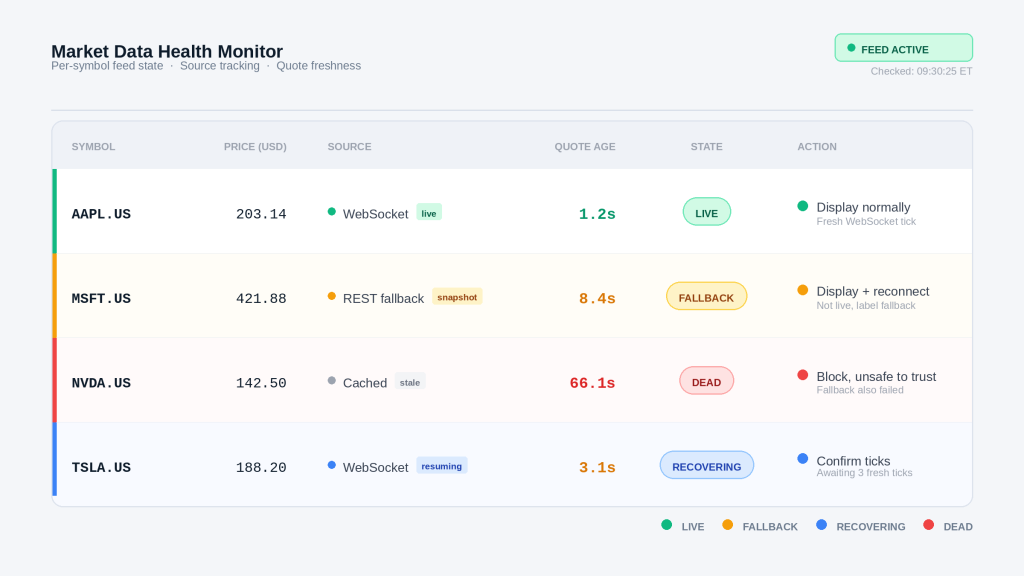
This is the table the operations side of the application should see, even if the user interface shows a simpler status. It gives engineering, support, and product teams the same view of what the market data layer currently trusts.
Market Data Recovery States: LIVE, STALE, FALLBACK, RECOVERING, and DEAD
A real-time feed should not have only two states: connected or disconnected. That hides too much. A feed can be connected while one symbol is stale, a fallback snapshot can be available while the stream is down, and a reconnect can start before the stream is stable enough to trust again.
A better model gives every quote a clear state.
| State | Meaning | Application Behavior |
|---|---|---|
| LIVE | WebSocket updates are fresh. | Show the price normally. |
| DEGRADED | The latest update is getting old, but still within a usable window. | Keep displaying the quote, but monitor it closely. |
| STALE | The latest update is too old to trust as live. | Request a fallback snapshot. |
| FALLBACK | A REST snapshot is being used because the stream became stale. | Display the quote with a fallback label. |
| RECOVERING | WebSocket updates have resumed, but the stream is not confirmed yet. | Wait for multiple fresh ticks before returning to live. |
| DEAD | No reliable live or fallback price is available. | Block trading, suppress alerts, or mark the quote unavailable. |
| MARKET_CLOSED | Live ticks are not expected because the session is closed. | Show the latest valid session value with a market-closed label. |
The thresholds depend on the product. A long-term portfolio dashboard may tolerate slower updates. A trading screen, alerting system, or intraday risk tool needs tighter freshness rules.
A simple starting point could look like this:
| Condition | State |
|---|---|
| Quote age is 3 seconds or less | LIVE |
| Quote age is above 3 seconds and up to 10 seconds | DEGRADED |
| Quote age is above 10 seconds | STALE |
| REST snapshot succeeds after a stale event | FALLBACK |
| WebSocket updates resume after fallback | RECOVERING |
| Three consecutive fresh WebSocket ticks arrive | LIVE |
| WebSocket data is stale and REST fallback fails | DEAD |
| Market session is closed | MARKET_CLOSED |
These thresholds are not universal. They should be adjusted by exchange, asset class, update frequency, market session, and the consequence of showing a stale price. A delayed watchlist and a trade confirmation screen should not share the same tolerance.
WebSocket Recovery and REST Fallback Architecture
The primary feed should be the WebSocket stream. It gives the application the live updates needed for dashboards, alerts, and intraday views. The fallback path should stay separate so the application can keep showing usable data without pretending the stream is healthy.
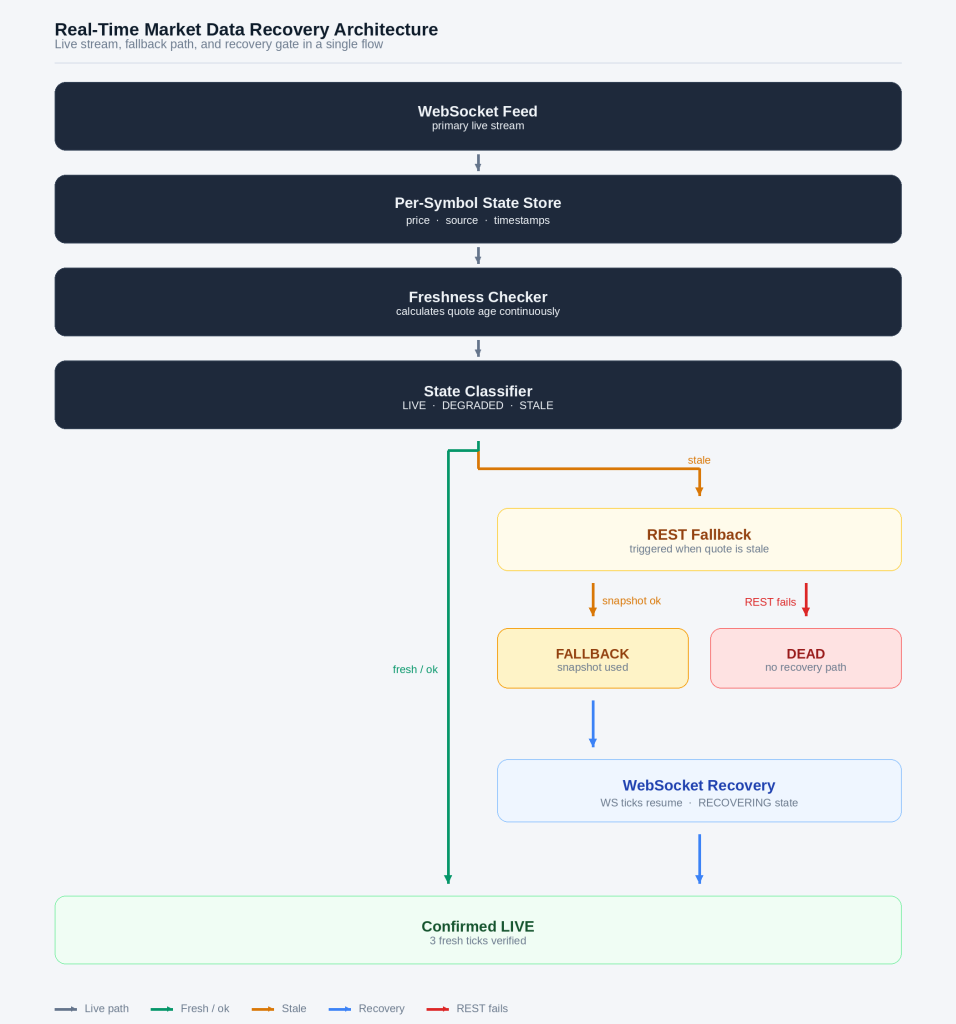
A practical recovery workflow looks like this:
- Receive real-time ticks from the WebSocket feed.
- Store the latest price, source, exchange timestamp, and received timestamp for each symbol.
- Calculate quote age continuously.
- Move symbols from
LIVEtoDEGRADEDand thenSTALEwhen updates slow down. - Request a
RESTsnapshot for stale symbols. - Mark successful snapshots as
FALLBACK. - Mark failed snapshots as
DEAD, cached, or unavailable. - Move symbols to
RECOVERINGwhen WebSocket updates resume. - Return to
LIVEonly after confirmed fresh ticks.
REST fallback is not a replacement for the live stream. It is a recovery layer. A fallback snapshot can keep a dashboard useful during a feed issue, but it should carry its own source label and timestamp. A user, alerting rule, or internal support tool should be able to tell the difference between a fresh WebSocket tick and a fallback REST price.
Historical EOD prices have a different role. They are useful for previous-close context, market-closed displays, reference checks, and sanity checks. They should not be treated as live recovery data. If the application shows a previous close during a live-feed failure, the source should say previous_close, cached, or market_closed.
Where The Recovery Model Gets Stress-Tested
A full WebSocket disconnect is easy to reason about. The connection drops, ticks stop arriving, and the application starts reconnect and fallback logic.
The harder failures are quieter.
One symbol freezes while the feed stays connected
AAPL.US, NVDA.US, and TSLA.US may keep updating while MSFT.US stops receiving fresh ticks. A connection-level check can still look healthy, so the application has to track quote age per symbol.
Expected path:
LIVE -> DEGRADED -> STALE
The fallback path is unavailable
A stale quote may trigger a REST snapshot, but the request can timeout, return no usable price, or fail for that symbol. The state machine should not assume fallback always works.
Expected path:
STALE -> DEAD
The application can show a cached value if the product allows it, but the quote should not be treated as live.
Recovery is noisy
WebSocket ticks may resume briefly and then pause again. Moving a symbol straight from FALLBACK to LIVE after one tick can create false recovery.
Expected path:
FALLBACK -> RECOVERING -> LIVE
The symbol should return to LIVE only after the configured number of fresh ticks arrives.
These cases expose the assumptions behind the workflow: freshness has to be symbol-level, fallback has to be labeled separately, and recovery has to be confirmed before the price is trusted again.
Python Example: Market Data Freshness, Fallback, And Health Table
The code does not need to build a full WebSocket client. The useful part is the state each symbol carries and the decision path when a quote becomes stale.
Exact Threshold Config Changes
live_threshold_seconds = 3
stale_threshold_seconds = 10
recovery_ticks_required = 3
These values should be visible because they define the application’s latency budget. A portfolio dashboard may tolerate slower updates. A trading screen, intraday alert, or risk workflow may need tighter freshness rules. The recovery tick count controls how many fresh WebSocket updates are required before a symbol returns from RECOVERING to LIVE.
Define The Quote Store
Start with a small per-symbol store.
quote_store = {
    symbol: {
        'price': None,
        'source': None,
        'exchange_time': None,
        'received_time': None,
        'age_seconds': None,
        'state': 'DEAD',
        'action': 'waiting'
    }
    for symbol in watchlist
}
Each symbol has its own row because feed health is not only a connection-level problem. A WebSocket can stay open while one ticker stops updating. The application needs to know which quote is fresh, which one is stale, and which one is using fallback data.
Update Quotes From WebSocket Ticks
When a fresh WebSocket tick arrives, the application updates the price, source, and timestamps for that symbol.
quote = quote_store[symbol]

quote['price'] = tick_price
quote['source'] = 'websocket'
quote['exchange_time'] = exchange_time
quote['received_time'] = received_time
quote['age_seconds'] = 0
quote['state'] = 'LIVE'
quote['action'] = 'display'
This keeps the latest trusted WebSocket value separate from any fallback value that may be used later.
Classify Freshness And Trigger Fallback
The freshness check runs separately. It compares the current time with the latest trusted received timestamp.
quote = quote_store[symbol]
age_seconds = (now - quote['received_time']).total_seconds()
quote['age_seconds'] = age_seconds

if age_seconds <= live_threshold_seconds:
    quote['state'] = 'LIVE'
    quote['action'] = 'display'
elif age_seconds <= stale_threshold_seconds:
    quote['state'] = 'DEGRADED'
    quote['action'] = 'monitor'
else:
    snapshot = fetch_rest_snapshot(symbol)

    if snapshot:
        quote['price'] = snapshot['price']
        quote['source'] = 'rest_fallback'
        quote['received_time'] = now
        quote['age_seconds'] = 0
        quote['state'] = 'FALLBACK'
        quote['action'] = 'display with fallback label'
    else:
        quote['state'] = 'DEAD'
        quote['action'] = 'block'
The REST snapshot does not quietly replace the WebSocket price. It changes the source to rest_fallback and moves the quote to FALLBACK. That label lets the interface, alerting layer, and support team treat the value differently from a live tick.
Build The Market Data Health Table
The state store can then be turned into a health table.
health_table = pd.DataFrame.from_dict(quote_store, orient='index')
health_table = health_table[
    ['price', 'source', 'age_seconds', 'state', 'action']
]
A simple output might look like this:
| Symbol | Price | Source | Age Seconds | State | Action |
|---|---|---|---|---|---|
| AAPL.US | 203.14 | websocket | 1.2 | LIVE | display |
| MSFT.US | 421.88 | rest_fallback | 0.0 | FALLBACK | display with fallback label |
| NVDA.US | 142.50 | websocket | 66.1 | DEAD | block |
| TSLA.US | 188.20 | websocket | 3.1 | DEGRADED | monitor |
This table makes the data layer inspectable. A stale symbol is no longer hidden behind a working connection, and fallback data is no longer mixed with live streaming data.
Example: How A Stale Quote Moves Through The Recovery Workflow
At this point, the application has the pieces needed to handle a quiet market data failure:
- a per-symbol quote record
- source labels
- received timestamps
- quote age
- recovery states
- REST fallback
- a health table
Now assume the WebSocket connection remains open. AAPL.US, NVDA.US, and TSLA.US keep receiving ticks. MSFT.US stops updating.
Nothing obvious breaks. The app still has a price for MSFT.US. The difference is that the quote age keeps increasing.
09:30:01 MSFT.US LIVE WebSocket tick received
09:30:06 MSFT.US DEGRADED no tick for 4.2s
09:30:12 MSFT.US STALE no tick for 10.5s
09:30:13 MSFT.US FALLBACK REST snapshot used
09:30:21 MSFT.US RECOVERING WebSocket updates resumed
09:30:25 MSFT.US LIVE 3 fresh ticks confirmed
The connection-level status would miss this failure. The WebSocket is still connected, and other symbols are still updating. The stale quote is visible only because the system tracks freshness per symbol.
| Time | State | What Changed |
|---|---|---|
| 09:30:01 | LIVE | A fresh WebSocket tick updated price, source, and timestamps. |
| 09:30:06 | DEGRADED | The quote is getting old, but still inside the monitoring window. |
| 09:30:12 | STALE | The last WebSocket update is too old to treat as live. |
| 09:30:13 | FALLBACK | A REST snapshot replaces the stale stream value, with rest_fallback as the source. |
| 09:30:21 | RECOVERING | WebSocket updates resume, but the stream is not trusted yet. |
| 09:30:25 | LIVE | The symbol receives enough fresh ticks to return to live status. |
The source label is what keeps the app honest during this sequence. At 09:30:13, the application can still show a usable MSFT.US price, but it should not treat that value as a live WebSocket tick. It came from REST fallback, so the quote state should say FALLBACK.
A failed fallback takes a different path:
09:31:02 NVDA.US STALE no tick for 11.3s
09:31:03 NVDA.US DEAD REST fallback failed
In that case, the last known price may still exist in memory, but it should not trigger trading actions, alerts, or live dashboard claims. The safer behavior is to block, warn, or show the value as cached depending on the product.
This is where the health table becomes useful. It gives the current state. The event sequence explains how the quote got there.
How To Test WebSocket Recovery And REST Fallback Before Launch
A recovery workflow should be tested with controlled failures before it reaches users. The test does not need a full market outage. A small replay script, staging feed, or mocked data stream can pause one symbol, delay ticks, replay old timestamps, and force REST fallback errors.
Run these failure drills before the workflow reaches production.
1. Pause One Symbol While The Feed Stays Connected
Simulate MSFT.US receiving no new WebSocket ticks while AAPL.US, NVDA.US, and TSLA.US continue updating.
Expected state path:
LIVE -> DEGRADED -> STALEOnly MSFT.US should change state. The other symbols should remain LIVE.
2. Return A Valid REST Snapshot After The Quote Becomes Stale
Once MSFT.US crosses the stale threshold, return a valid REST snapshot.
Expected state path:
STALE -> FALLBACKThe quote should update its price, but the source should change to rest_fallback. It should not return to LIVE.
3. Force The REST Snapshot To Fail
Return a timeout, empty response, or unusable price after the quote becomes stale.
Expected state path:
STALE -> DEADThe app should not keep using the last WebSocket value as if it were current. Depending on the product, it can block the quote, show a cached label, or mark the symbol unavailable.
4. Resume WebSocket Updates After Fallback
Send fresh WebSocket ticks again after the symbol has entered FALLBACK.
Expected state path:
FALLBACK -> RECOVERING -> LIVEThe symbol should not return to LIVE after one tick. It should wait until the confirmed-tick rule is satisfied.
5. Replay An Older Tick
Send a tick with an exchange timestamp older than the latest accepted update.
Expected behavior:
older tick rejectedThe app should not overwrite a fresher price with an older update.
6. Test Market-Closed Behavior
Stop live ticks during a closed session.
Expected state:
MARKET_CLOSEDThe app should not mark the quote as stale when no live updates are expected.
Many teams test full disconnects and miss partial failures. A WebSocket can stay open while one symbol freezes, one exchange becomes delayed, or one fallback request fails. The test suite should catch those cases before they reach a dashboard, alert, or trading workflow.
A test should fail if stale data can reach a user-facing quote, trading action, or alert without a source label and state.
Production Checklist For Real-Time Market Data Reliability
Before prices reach a dashboard, alert, or trading workflow, the application should be able to answer four questions for every quote:
- Where did this price come from?
- How old is it?
- What state is it in?
- What is the safest next action?
A compact production checklist looks like this:
| Check | Production Rule |
|---|---|
| Source label | Every price should be labeled as websocket, rest_fallback, cached, previous_close, or market_closed. |
| Timestamp tracking | Store both exchange timestamp and received timestamp when available. |
| Quote age | Calculate freshness from the latest trusted update, not from connection status. |
| Symbol-level state | Track LIVE, DEGRADED, STALE, FALLBACK, RECOVERING, DEAD, and MARKET_CLOSED per symbol. |
| Out-of-order ticks | Reject ticks older than the latest accepted timestamp for that symbol. |
| REST fallback | Mark REST snapshots as FALLBACK, not LIVE. |
| Failed fallback | Move the symbol to DEAD, cached, or unavailable when fallback fails. |
| WebSocket recovery | Move resumed updates to RECOVERING before returning to LIVE. |
| Confirmed live state | Require multiple fresh ticks before confirming live status. |
| Historical prices | Use EOD or previous-close prices only as labeled reference context. |
| Safety controls | Do not let stale prices trigger alerts, trades, or automated decisions. |
| Monitoring | Track stale symbol count, fallback rate, fallback errors, reconnects, and symbols stuck in recovery. |
The checklist should stay short. It should not try to include every possible production edge case. Its job is to capture the minimum rules that prevent stale, cached, or fallback prices from being treated as live market data.
How EODHD Supports A Recoverable Market Data Workflow
A recoverable market data layer depends on more than one feed. The live stream handles the normal path. REST endpoints support fallback when a quote becomes stale. Historical prices provide previous-close and reference context when live data is unavailable or the market session is closed.
EODHD fits into this workflow as the data layer behind those paths.
Real-time WebSocket data can serve as the primary source for dashboards, alerts, watchlists, and intraday views. When the stream becomes stale for a symbol, the application can request a REST snapshot and label the result as FALLBACK instead of treating it as a live tick. Historical EOD prices can then support previous-close displays, sanity checks, and market-closed states without being confused with real-time recovery data.
The reliability still has to be designed inside the application. EODHD can provide the market data feeds and API access, but the application should decide how to calculate quote age, classify state, trigger fallback, confirm recovery, and block unsafe actions.
That separation is important. A good provider gives the application multiple data paths. A good production system makes those paths explicit. The final workflow should make it clear whether a price came from WebSocket data, REST fallback, cached data, or historical reference data before the price reaches a user, alert, or trading workflow.
Never Show A Market Price Without Its Source, Age, And State
A connected WebSocket does not prove every quote is live. One symbol can stop updating while the rest of the watchlist continues to move, and the last price can remain on screen long after it is safe to trust.
A recoverable market data layer makes that state visible. It keeps the live stream, REST fallback, cached values, and historical reference prices separate, then labels each quote by source, age, state, and next action.
Before a price reaches a dashboard, alert, screener, or trading workflow, the application should know exactly where it came from and how fresh it is. If it cannot answer that, it should not treat the price as live.