
You type =GOOGLEFINANCE(“SGO:FALABELLA”, “price”) and get #N/A. Change the ticker to NASDAQ:AAPL and the price appears at once. Same function, same sheet, but GOOGLEFINANCE is not working for the first one.
That’s what most “GOOGLEFINANCE not working” searches come down to: coverage, not a broken formula. In a test sheet with ten instruments, the GOOGLEFINANCE function priced four US tickers with no delay and stocks from Madrid, São Paulo, Mexico and Buenos Aires 15 to 20 minutes late. It returned #N/A for every attribute of a stock listed in Santiago, and gave a mutual fund’s price but #N/A for its delay.
You don’t need to rebuild the sheet. Keep GOOGLEFINANCE where it works and fill the gaps with a second source: one IMPORTDATA formula pointed at the EODHD API for single values, and the EODHD Google Sheets add-on for full price histories. Below are the failing cases from that test, the formulas that replaced them, and the three sheet settings that decide whether IMPORTDATA returns the right numbers.
Quick jump:
- 1 Where GOOGLEFINANCE is not working: the #N/A cases
- 2 What GOOGLEFINANCE does well, and where it is not working
- 3 How to get your EODHD API key
- 4 When GOOGLEFINANCE is not working: stock prices with IMPORTDATA and the EODHD API
- 5 Three settings to check before IMPORTDATA works
- 6 Larger datasets with the EODHD Google Sheets add-on
- 7 Build a stock tracker that combines both
- 8 GOOGLEFINANCE vs EODHD in Google Sheets
- 9 Conclusion
- 10 FAQs
Where GOOGLEFINANCE is not working: the #N/A cases
I built a sheet with ten instruments: four US tickers, five Latin American and European stocks, and one US mutual fund. Column C asks GOOGLEFINANCE for the price, and column D asks for datadelay, the number of minutes the quote is delayed.
=GOOGLEFINANCE(A2, "price")
=GOOGLEFINANCE(A2, "datadelay")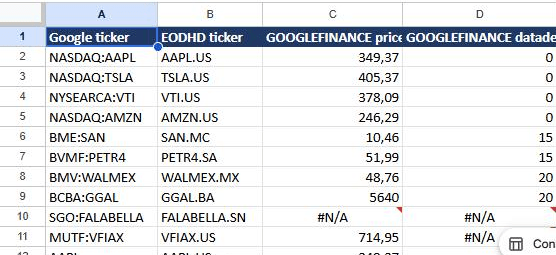
The values from that sheet:
| Google ticker | GOOGLEFINANCE price | datadelay (minutes) |
|---|---|---|
| NASDAQ:AAPL | 350.15 | 0 |
| NASDAQ:TSLA | 405.29 | 0 |
| NYSEARCA:VTI | 377.23 | 0 |
| NASDAQ:AMZN | 245.59 | 0 |
| BME:SAN (Banco Santander, Madrid) | 10.51 | 15 |
| BVMF:PETR4 (Petrobras, São Paulo) | 52.33 | 15 |
| BMV:WALMEX (Walmex, Mexico) | 48.55 | 20 |
| BCBA:GGAL (Grupo Galicia, Buenos Aires) | 5530 | 20 |
| SGO:FALABELLA (Falabella, Santiago) | #N/A | #N/A |
| MUTF:VFIAX (Vanguard 500 Index Admiral) | 714.95 | #N/A |
Three patterns explain when GOOGLEFINANCE is not working.
First, the Santiago stock returned #N/A for every attribute. Google’s own help page says GOOGLEFINANCE “does not support most international exchanges”, and the Santiago exchange isn’t in the list of exchanges on the Google Finance disclaimer page.
Second, the mutual fund returned a price but #N/A for datadelay. Google’s help page states that “Mutual fund attributes are currently not supported in Google Sheets”, and the disclaimer page lists mutual fund prices as end-of-day.
Finally, the quotes that did work came with different delays: none for the US tickers, 15 minutes for Madrid and São Paulo, and 20 minutes for Mexico and Buenos Aires. Google describes the price attribute as a “real-time price quote, delayed by up to 20 minutes”.
A ticker without its exchange prefix, such as AAPL instead of NASDAQ:AAPL, still returned a price in this test. Google’s documentation calls the exchange symbol “mandatory” for accurate results, because without it GOOGLEFINANCE “will use its best judgement to choose one for you”. Include it anyway.
What GOOGLEFINANCE does well, and where it is not working
For US stocks and ETFs, GOOGLEFINANCE is fast and convenient. Its historical closes held up in this test too: I requested Apple’s daily closes for October 20 to 28, 2026, and all seven matched the EODHD end-of-day API.
=GOOGLEFINANCE("NASDAQ:AAPL", "close", DATE(2026,10,20), DATE(2026,10,28))However, its limits are about scope rather than accuracy:
- GOOGLEFINANCE covers prices, a few ratios such as pe and eps, and daily or weekly history. Its attribute list doesn’t include financial statements or dividend histories, and its history intervals are DAILY or WEEKLY.
- Google states that the data is “not for financial industry professional use” and that “Historical data cannot be downloaded or accessed via the Sheets API or Apps Script”.
- The help page also notes that “Some attributes may not yield results for all symbols”, which is what happened with the fund above.
When GOOGLEFINANCE is not working for your markets, funds or fundamentals, you need a second source.
How to get your EODHD API key
1. Use the “demo” API key to test our data from a limited set of tickers without registering:
AAPL.US | TSLA.US | VTI.US | AMZN.US | BTC-USD | EUR-USD
Real-Time Data and all of the APIs (except Bulk) are included without API calls limitations with these tickers and the demo key.
2. Register to get your free API key (limited to 20 API calls per day) with access to:
End-Of-Day Historical Data with only the past year for any ticker, and the List of tickers per Exchange.
3. To unlock your API key, we recommend to choose the subscription plan which covers your needs.
When GOOGLEFINANCE is not working: stock prices with IMPORTDATA and the EODHD API
IMPORTDATA fetches the content of a URL into the sheet. With EODHD’s filter parameter, the API returns a single value, so each formula fills exactly one cell:
=IMPORTDATA("https://eodhd.com/api/real-time/SAN.MC?api_token=YOUR_API_KEY&fmt=json&filter=close")In the test sheet, the ticker sits in column B and the API key in a separate tab named Key, so one formula can be copied down the whole column:
=IMPORTDATA("https://eodhd.com/api/real-time/"&B2&"?api_token="&Key!$A$1&"&fmt=json&filter=close")EODHD tickers use the symbol plus an exchange code: AAPL.US, SAN.MC for Madrid, PETR4.SA for São Paulo, WALMEX.MX for Mexico, GGAL.BA for Buenos Aires and FALABELLA.SN for Santiago.
The demo key covers a few tickers such as AAPL.US. For other tickers, use your own API key. The free plan includes 20 API calls a day and one year of end-of-day prices, without fundamentals. Each real-time formula is one API call and each fundamentals formula is ten, so a sheet with ten tickers and both columns uses 110 calls every time it refreshes. Fundamentals fields such as the P/E need the Fundamentals Data Feed or All-In-One plan.
Here is the same sheet with both sources side by side, after the EODHD formulas refreshed on October 29, 2026.
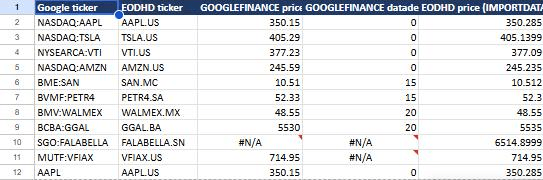
The same values as a table:
| Instrument | GOOGLEFINANCE price | EODHD price (IMPORTDATA) |
|---|---|---|
| AAPL | 350.15 | 350.285 |
| TSLA | 405.29 | 405.1399 |
| VTI | 377.23 | 377.09 |
| AMZN | 245.59 | 245.235 |
| SAN (Madrid) | 10.51 | 10.512 |
| PETR4 (São Paulo) | 52.33 | 52.3 |
| WALMEX (Mexico) | 48.55 | 48.55 |
| GGAL (Buenos Aires) | 5530 | 5535 |
| FALABELLA (Santiago) | #N/A | 6514.8999 |
| VFIAX (fund) | 714.95 | 714.95 |
Prices differ slightly between the columns. Each source updates on its own schedule: Google says GOOGLEFINANCE quotes can be delayed up to 20 minutes, and that import functions check for updates every hour.
The Santiago stock and the mutual fund, the two rows where GOOGLEFINANCE returned #N/A, both have values.
Fundamentals use the same pattern with a filter on the fundamentals endpoint, for example the P/E:
=IMPORTDATA("https://eodhd.com/api/fundamentals/"&B2&"?api_token="&Key!$A$1&"&filter=Highlights::PERatio")Three settings to check before IMPORTDATA works
The first time a sheet uses IMPORTDATA, Google Sheets shows a warning that some formulas send and receive data from third parties. The EODHD cells show #REF! until an editor clicks Allow access in that banner.
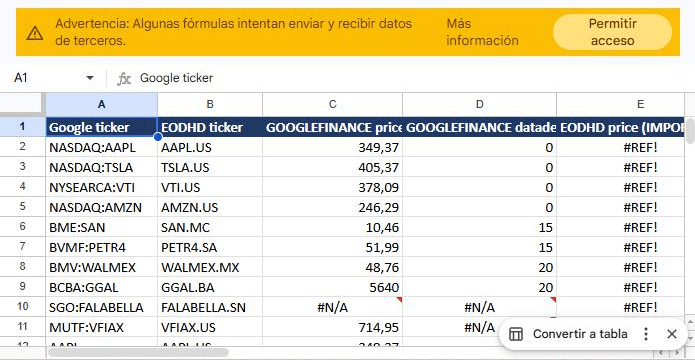
The spreadsheet locale decides how IMPORTDATA reads numbers. The EODHD API returns values with a period as the decimal separator, such as 10.456. In a sheet whose locale uses a decimal comma, Google Sheets can read that period as a thousands separator. In my test sheet, created with a Spanish locale, 10.456 became 10456 and 39.7951 became 397951. Set the spreadsheet locale under File > Settings to United States, or another locale that uses a decimal point. In my test, the values were correct after I switched the locale and IMPORTDATA refreshed.
Also, IMPORTDATA results are cached. According to Google, import functions “automatically check for updates every hour while the document is open”. For a value that has to change during the trading day, that hourly refresh is the practical limit. Google notes that overwriting the cells with the same formula triggers a refresh.
Larger datasets with the EODHD Google Sheets add-on
For more than a handful of values, such as months of daily prices, a full fundamentals report or technical indicators, the EODHD add-on for Google Sheets loads the data without formulas.
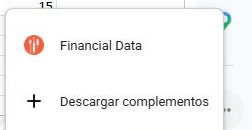
- Install Financial Data, published by EODHD Financial APIs, from the Google Workspace Marketplace, and accept the permissions it requests.
- Reload the spreadsheet. The add-on appears in the side panel on the right, under the add-ons button. Click Financial Data, then Continue.
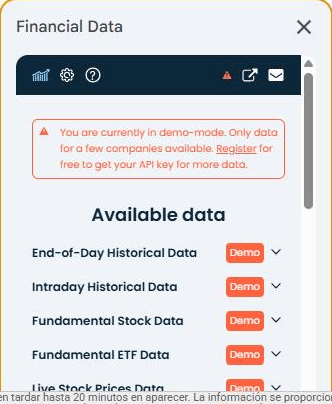
- Click Explore data. Without an API key the add-on runs in demo mode, which covers a few tickers such as AAPL.US. The demo banner links to registration for a free API key, which unlocks more data.
The Available data list shows End-of-Day Historical Data, Intraday Historical Data, Fundamental Stock Data, Fundamental ETF Data, Live Stock Prices Data and Technical indicators. Stock Market Screener, Bulk For EOD and Bulk Fundamental Data are listed as not available in demo mode.
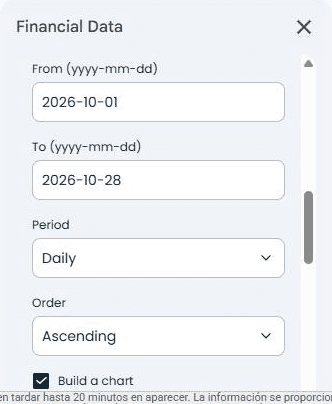
To load end-of-day prices:
- Open End-of-Day Historical Data, search for the ticker, select it and click Add. It moves to the List of tickers for request.
- Enter the From and To dates in yyyy-mm-dd format, and choose the Period and Order.
- Tick Build a chart if you want one, then click Insert data to a new sheet.
For AAPL.US from October 1 to October 28, 2026, the add-on created a new tab named AAPL.US EOD with the columns date, low, open, close, high, adjusted_close and volume, plus a chart next to the table.
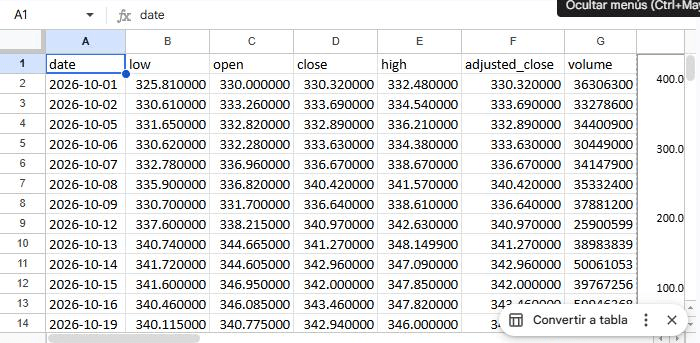
The request wrote its result to a new tab, so the tracker sheet with the IMPORTDATA formulas stayed untouched. Keeping formulas on one tab and add-on results on others makes the workbook easier to maintain.
Build a stock tracker that combines both
A practical setup mixes the two sources:
- Keep GOOGLEFINANCE for US tickers where it works and the delay is acceptable.
- Use IMPORTDATA with EODHD wherever GOOGLEFINANCE is not working, such as uncovered exchanges and funds, and for fundamentals fields.
- Use the EODHD add-on to load history and full fundamentals into separate tabs.
For a complete portfolio sheet with positions, weights and returns, see How to Create a Google Sheets Stock Portfolio Spreadsheet on the EODHD Academy.
GOOGLEFINANCE vs EODHD in Google Sheets
| GOOGLEFINANCE | EODHD with IMPORTDATA | EODHD add-on | |
|---|---|---|---|
| Setup | None | API key, Allow access, locale with decimal point | Install from the Marketplace; demo mode without a key |
| US stocks and ETFs in this test | Yes | Yes | Yes (AAPL.US, demo) |
| Santiago stock in this test | #N/A | Yes | Not tested |
| Mutual fund in this test | Price only, datadelay #N/A | Price | Not tested |
| Quote delay in this test | 0 to 20 minutes, by exchange | Depends on plan | Depends on plan |
| Refresh | Quotes delayed up to 20 minutes | Checked every hour | When you run a request |
| Fundamentals | A few attributes (pe, eps, marketcap) | Single fields with filter | Listed (Fundamental Stock Data) |
| Daily history | Yes (DAILY or WEEKLY) | Yes (CSV) | Yes, tested with AAPL.US |
| Intraday history | No intraday interval | Not covered in this guide | Listed (Intraday Historical Data) |
Conclusion
GOOGLEFINANCE works well for US tickers and daily history, and it’s the quickest way to start. When GOOGLEFINANCE is not working for an exchange or a fund, or a sheet needs fundamentals, an IMPORTDATA formula with the EODHD API fills the same cells, as long as the sheet allows external data and uses a locale with a decimal point.
FAQs
Q: Why is GOOGLEFINANCE not working in my sheet?
The most common causes are an exchange that GOOGLEFINANCE doesn’t support, a mutual fund attribute (Google says mutual fund attributes aren’t supported in Sheets), or an attribute that isn’t available for that symbol. In each case the cell shows #N/A. Also check that the ticker includes its exchange, which Google’s documentation calls mandatory.
Q: Why does GOOGLEFINANCE return #N/A for some international stocks?
Google’s documentation says GOOGLEFINANCE “does not support most international exchanges”. In this test, a stock listed in Santiago returned #N/A, while stocks in Madrid, São Paulo, Mexico and Buenos Aires returned prices with a 15- or 20-minute delay.
Q: How do I get stock prices in Google Sheets without GOOGLEFINANCE?
Use IMPORTDATA with a data API that returns a single value per URL, such as the EODHD real-time endpoint with filter=close, or install a market data add-on such as EODHD’s Financial Data add-on.
Q: Why does IMPORTDATA show the wrong number?
Check the spreadsheet locale under File > Settings. If the locale uses a decimal comma, a value such as 10.456 can be read as ten thousand four hundred fifty-six. Switch to a locale that uses a decimal point.
Q: How often does IMPORTDATA refresh?
Google says import functions check for updates every hour while the document is open, and that overwriting the cells with the same formula triggers a refresh.